Using cubemap render target textures
Cubemap render target texture and render to cubemap composer are used for creating cubemap textures dynamically from the viewpoint of an object you select, thus simulating a mirroring surface.
Rendering cubemap texture on an object
To render cubemap texture on an object:
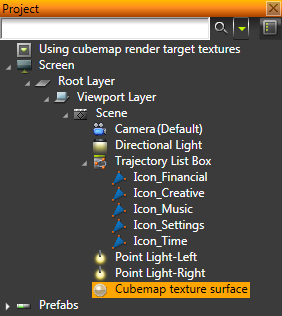
- In the Project create the environment you want to render on an object and the object on the surface of which you want to render a cubemap texture of that environment.
For example, as environment create and populate a Trajectory List Box and as an object on the surface of which you render a cubemap texture of that environment, create a Sphere. See Using trajectory list boxes.
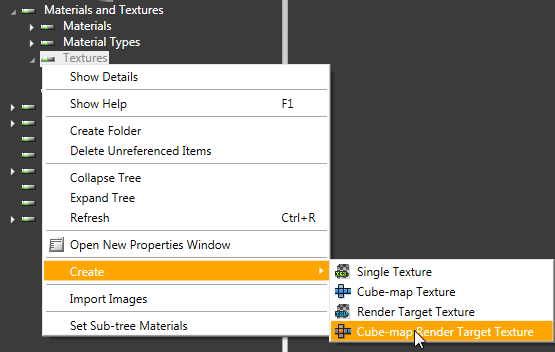
- In the Library right-click Materials and Textures and select Create > Cube-map Render Target Texture.
- In the Library right-click Materials and Textures, select Load Material Type From Disk and load a material type that supports cubemaps. See Shaders and Using material types.
For example, load PhongCube material type.
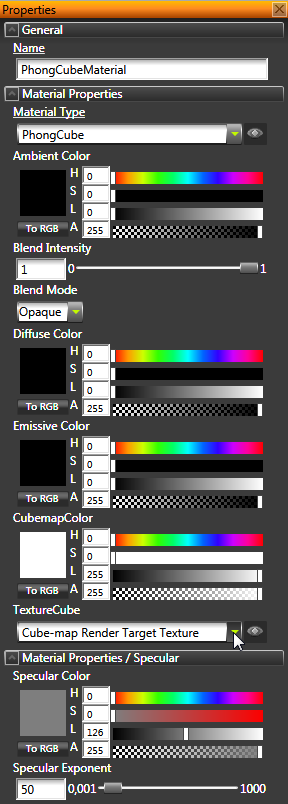
- In the Library select or create a material that uses a material type that supports cubemaps and in the Properties set the TextureCube property to the Cube-map Render Target Texture you created earlier.
- In the Project select the object on the surface of which you want to render the cubemap texture, and in the Properties set the Material property to the material that uses a material type that supports cubemaps.
For example, select the Sphere and set its Material property to PhongCube.
- In the Library right-click Composing > Composers > Composer, select Create > Render to Cube-map Composer, and add a Render Pass to the Render to Cube-map Composer.
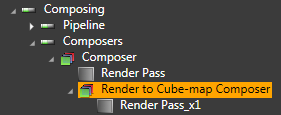
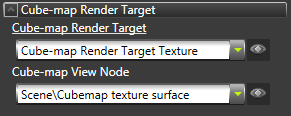
- In the Library select the Render to Cube-map Composer and set:
- Cube-map Render Target to to the cubemap render target texture you created earlier in this procedure. For example, Cube-map Render Target Texture.
All render passes in this composer are rendered to the texture you select in this property.
- Cube-map View Node to the object on the surface of which you want to render the cubemap texture.
For example, set this property to the Sphere.
Kanzi aligns the cubemap faces to Kanzi global coordinate space regardless of the position and orientation of the target.
The object you created in the first step dynamically reflects the environment in the scene.
See also
Shaders
Using rendering effects
Using the shadow map composer
Composers
Using cubemap textures
Open topic with navigation